 Web3 investigation desk
Chainscope
Investigate transactions, bridges, contracts, DAOs and wallets in one case file.
Chainscope is a web3 investigation desk that turns fifteen usefulweb.site blockchain tools into one case file. Collect wallets, contracts, transaction hashes and DAO spaces, run decoders, bridge trackers, upgrade and permission checks, incident replays, MEV, gas, stablecoin, rollup and token-unlock explorers on them, and read one dashboard of findings with a merged entity graph, a timeline with calendar reminders, run-to-run comparisons and a printable report. Results feed the next step: a decoded transaction suggests the MEV check of its block, an upgradeable proxy suggests a look at its implementation and admin.

Screenshots
 Findings dashboard with suggested next steps
 One check: live result, findings and next steps
 Merged case graph across all tools
 Timeline with calendar reminders
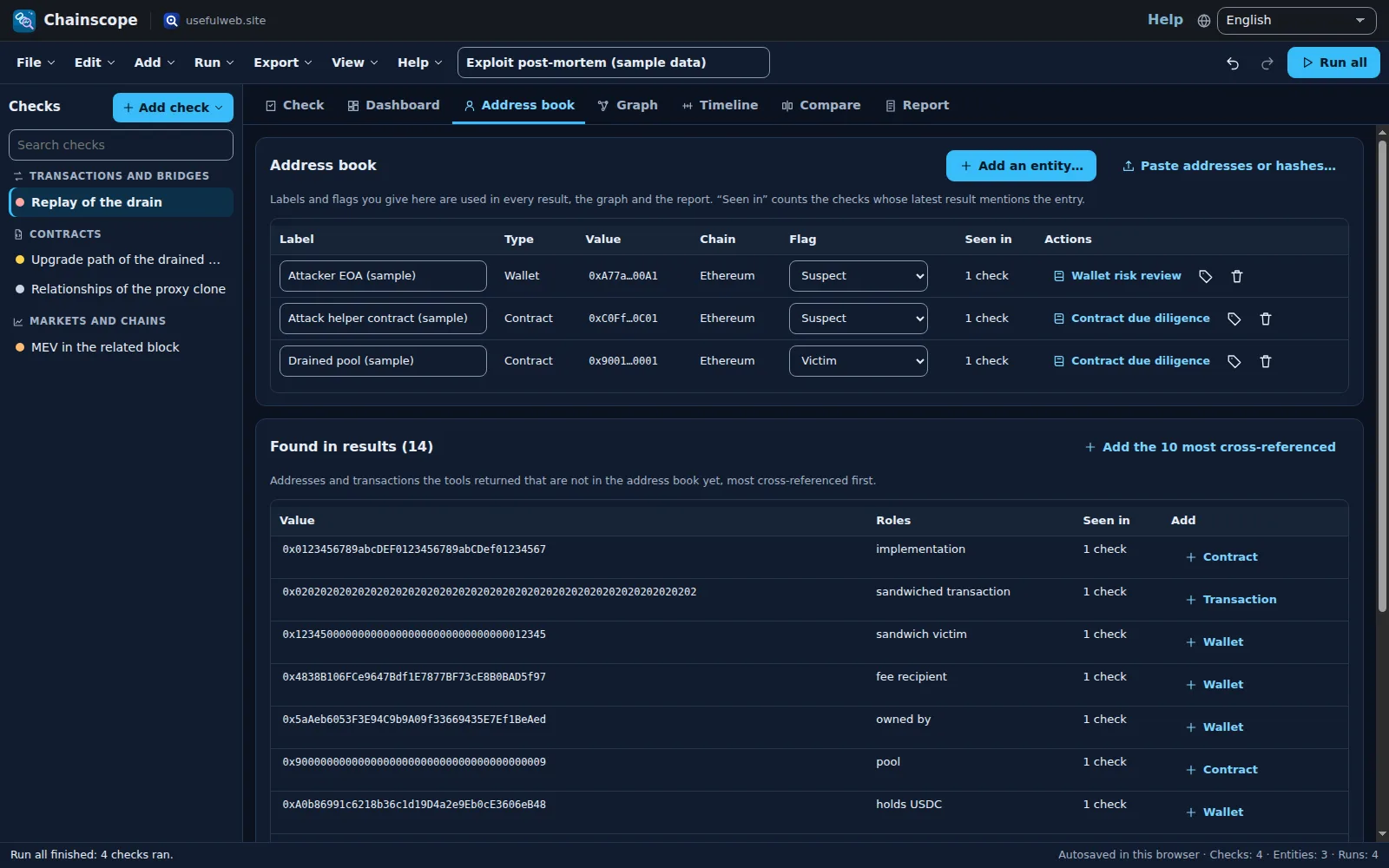 Address book and cross-references in the dark theme
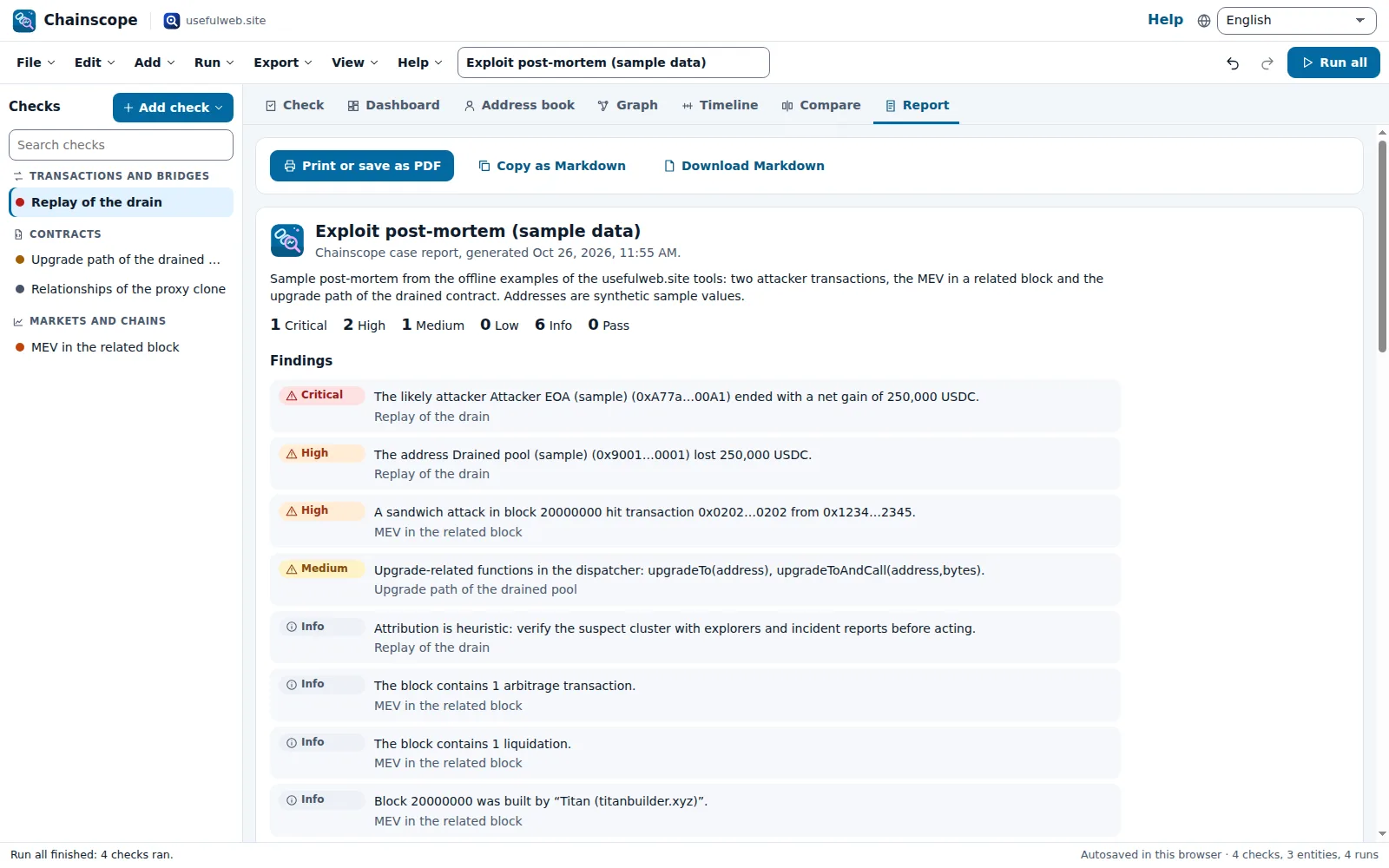 Consolidated case report
Features
One case file per investigation
Wallets, contracts, transaction hashes, tokens and DAO spaces in an address book with labels, flags (suspect, victim, trusted, watch) and tags, next to the checks that ran on them and a timestamped case journal.
Fifteen web3 tools, one desk
Transaction decoder, bridge tracker, cross-chain explorer, ERC-4337 explorer, incident replay, upgrade and relationship graphs, wallet permissions, Aave liquidations, DAO governance, token unlocks, gas, stablecoin flows, MEV and rollup batches.
Playbooks
Pick a transaction, contract, wallet or DAO and add the matching checks in one go: “Investigate a transaction” decodes it, tracks bridges, follows cross-chain hops and inspects smart-account bundles.
Results feed the next step
Every result suggests follow-up checks with its own data: the block of a decoded transaction goes to the MEV explorer, a proxy’s implementation and admin to the upgrade check, a bridge’s destination transaction to the decoder.
Findings dashboard
All results become severity-ranked findings — reverted transactions, stuck bridge transfers, single-key upgrade admins, unlimited approvals, sandwiches, liquidatable borrowers, concentrated votes, near unlocks — with filters and a jump to the check.
Merged case graph
The graphs of all tools in one picture: addresses are merged across checks, labelled from your address book and coloured by flag; export it as SVG or PNG.
Cross-references
Chainscope lists every address and hash the tools returned, with its roles and the checks it appears in, so the wallet that shows up in three results stands out. Add it to the address book with one click.
Changes over time
Each check keeps its run history: new and resolved findings, changed metrics and sparklines show what moved between yesterday’s and today’s gas, supply, approvals or health factor. Stale live results are marked.
Scenario A/B
Compare two checks or two runs side by side — two contracts, two chains, before and after a revoke — metric by metric, with the findings only one side has.
Batch runs
Paste up to 50 transaction hashes or addresses and run the same check over each, with progress, rate-limit waits, a result table and a CSV.
Timeline and reminders
Incident transactions, cross-chain hops, liquidations, proposal deadlines, token unlocks and your re-check dates on one timeline, exported as an .ics calendar with alarms.
Consolidated report
A printable case report (PDF via print) with findings, address book, checks, timeline, graph and journal, plus CSV, JSON, Markdown, SVG and PNG exports.
Live or pasted data
Each check reads the chain live or decodes pasted receipts, logs, bytecode or block JSON — useful for archived incidents, private RPC exports and offline demos. Earlier results stay readable without a connection.
Cases that travel
Autosave and recent cases in your browser, case files, share links, undo/redo, six templates and Google Drive saving.
API, MCP & App Bridge
Every tool is available through the JSON API and MCP on the app host; findings, tables, reports and the graph go to other premium apps, and text with addresses or hashes comes in from them.


Templates
Start from a ready-made project and change it to fit.
USDC contract due diligence
Live look-ups of the USDC token on Ethereum: who can upgrade it, how its contracts relate, the type of the admin account and today’s USDC flows.
Where is my bridged USDC? (sample data)
A Circle CCTP transfer from Ethereum to Base, decoded from the tools’ sample logs: bridge status, cross-chain path and the token call. Swap in your own transaction hash.
Exploit post-mortem (sample data)
Replay of a flash-loan drain with timeline, fund flows and suspects, plus the block’s MEV and the bytecode of the contracts involved — all from offline sample data.
Wallet approval hygiene (sample data)
Approvals, NFT operators and Permit2 allowances of a wallet, a smart-account bundle and Aave liquidations from offline sample data, with a re-check reminder.
Daily market desk
Live gas on seven chains, USDT flows, MEV in the latest Ethereum block, Base batch status and fresh Aave liquidations — re-run daily and compare.
DAO votes and token unlocks
Live Aave DAO proposals and vote concentration, a sample DAO with a quorum problem, and two vesting schedules on one timeline with calendar reminders.
Built-in tools
Chainscope uses these tools. Each one also has its own page and works on its own, in the browser, through the JSON API and through MCP.
- Transaction DecoderSee what an EVM transaction actually did: call, events, token transfers, fee, finality.
- Bridge Transfer TrackerWhere is my bridged money? Finds the bridge deposit in a transaction and checks if it arrived.
- Cross-Chain Transaction ExplorerFollow one transaction across chains: source tx, bridge deposit and destination fill on a timeline.
- Account Abstraction ExplorerDecode ERC-4337 bundles: UserOperations, paymasters, gas per op, deployed smart accounts.
- Blockchain Incident ReplayReplay an exploit from tx hashes: ordered timeline, fund-flow graph and who profited.
- Smart Contract Upgrade ExplorerIs this smart contract upgradeable, who controls upgrades, and what changed?
- Smart Contract Relationship GraphMap a contract's proxy, implementation, admin, owner, deployer/factory and token links as a graph.
- Wallet Permission ExplorerWho can move your tokens? Allowances, Permit2, NFT operators and EIP-7702 delegation, with risk.
- DeFi Liquidation ExplorerRecent Aave V3 liquidations in USD, who liquidated whom, and a live health-factor check.
- DAO Governance ExplorerSnapshot proposals, vote concentration, Governor state and treasury balances in one view.
- Token Unlock ExplorerModel token vesting (cliff, linear, monthly, tranches, TGE) or audit a VestingWallet.
- Gas Fee Intelligence ExplorerLive gas on 7 EVM chains: base fee, tips, trend and the USD cost of transfers and swaps.
- Stablecoin Flow ExplorerUSDC/USDT supply per chain, recent mints, burns and whale transfers, cross-chain totals.
- MEV ExplorerWho extracted value in this block? Sandwiches, arbitrage, liquidations, builder and tips.
- Rollup Batch ExplorerHow L2 transactions reach Ethereum: unsafe → safe → finalized, blobs, batch costs, withdrawal waits.
For AI agents
Chainscope runs on a deterministic engine. The same functions are available as tools with a JSON API and MCP, so scripts and AI agents get exactly the results the app shows.
- Transaction Decoder – See what an EVM transaction actually did: call, events, token transfers, fee, finality.
Tool page ·POST https://chainscope.usefulweb.site/api/v1/tools/transaction-decoder/calculate· MCPtransaction_decoder - Bridge Transfer Tracker – Where is my bridged money? Finds the bridge deposit in a transaction and checks if it arrived.
Tool page ·POST https://chainscope.usefulweb.site/api/v1/tools/bridge-transfer-tracker/calculate· MCPbridge_transfer_tracker - Cross-Chain Transaction Explorer – Follow one transaction across chains: source tx, bridge deposit and destination fill on a timeline.
Tool page ·POST https://chainscope.usefulweb.site/api/v1/tools/cross-chain-transaction-explorer/calculate· MCPcross_chain_transaction_explorer - Account Abstraction Explorer – Decode ERC-4337 bundles: UserOperations, paymasters, gas per op, deployed smart accounts.
Tool page ·POST https://chainscope.usefulweb.site/api/v1/tools/account-abstraction-explorer/calculate· MCPaccount_abstraction_explorer - Blockchain Incident Replay – Replay an exploit from tx hashes: ordered timeline, fund-flow graph and who profited.
Tool page ·POST https://chainscope.usefulweb.site/api/v1/tools/blockchain-incident-replay/calculate· MCPblockchain_incident_replay - Smart Contract Upgrade Explorer – Is this smart contract upgradeable, who controls upgrades, and what changed?
Tool page ·POST https://chainscope.usefulweb.site/api/v1/tools/contract-upgrade-explorer/calculate· MCPcontract_upgrade_explorer - Smart Contract Relationship Graph – Map a contract's proxy, implementation, admin, owner, deployer/factory and token links as a graph.
Tool page ·POST https://chainscope.usefulweb.site/api/v1/tools/smart-contract-relationship-graph/calculate· MCPsmart_contract_relationship_graph - Wallet Permission Explorer – Who can move your tokens? Allowances, Permit2, NFT operators and EIP-7702 delegation, with risk.
Tool page ·POST https://chainscope.usefulweb.site/api/v1/tools/wallet-permission-explorer/calculate· MCPwallet_permission_explorer - DeFi Liquidation Explorer – Recent Aave V3 liquidations in USD, who liquidated whom, and a live health-factor check.
Tool page ·POST https://chainscope.usefulweb.site/api/v1/tools/defi-liquidation-explorer/calculate· MCPdefi_liquidation_explorer - DAO Governance Explorer – Snapshot proposals, vote concentration, Governor state and treasury balances in one view.
Tool page ·POST https://chainscope.usefulweb.site/api/v1/tools/dao-governance-explorer/calculate· MCPdao_governance_explorer - Token Unlock Explorer – Model token vesting (cliff, linear, monthly, tranches, TGE) or audit a VestingWallet.
Tool page ·POST https://chainscope.usefulweb.site/api/v1/tools/token-unlock-explorer/calculate· MCPtoken_unlock_explorer - Gas Fee Intelligence Explorer – Live gas on 7 EVM chains: base fee, tips, trend and the USD cost of transfers and swaps.
Tool page ·POST https://chainscope.usefulweb.site/api/v1/tools/gas-fee-intelligence-explorer/calculate· MCPgas_fee_intelligence_explorer - Stablecoin Flow Explorer – USDC/USDT supply per chain, recent mints, burns and whale transfers, cross-chain totals.
Tool page ·POST https://chainscope.usefulweb.site/api/v1/tools/stablecoin-flow-explorer/calculate· MCPstablecoin_flow_explorer - MEV Explorer – Who extracted value in this block? Sandwiches, arbitrage, liquidations, builder and tips.
Tool page ·POST https://chainscope.usefulweb.site/api/v1/tools/mev-explorer/calculate· MCPmev_explorer - Rollup Batch Explorer – How L2 transactions reach Ethereum: unsafe → safe → finalized, blobs, batch costs, withdrawal waits.
Tool page ·POST https://chainscope.usefulweb.site/api/v1/tools/rollup-batch-explorer/calculate· MCProllup_batch_explorer
- MCP endpoint (Streamable HTTP):
https://chainscope.usefulweb.site/mcp - Project file format (JSON Schema): https://chainscope.usefulweb.site/project.schema.json
- OpenAPI description: /openapi.json · llms.txt · API & MCP
Build a project through the API, then open it in the app with a link to https://chainscope.usefulweb.site/app#project=<base64url JSON>.
Import & export
Import
- Chainscope case (.chainscope.json)
- Text or CSV with addresses, transaction hashes and Snapshot spaces
- Case link (#project=…)
- Text from other apps (App Bridge)
Export
- Chainscope case (.chainscope.json)
- Findings CSV and JSON
- Address book CSV
- Batch results CSV
- Case report (Markdown)
- Reminders calendar (.ics)
- Case graph (SVG, PNG)
- Printable report (PDF via print)
Keyboard shortcuts
| Keys | Action |
|---|---|
| Ctrl + Enter | Run the selected check |
| Ctrl + Shift + Enter | Run all checks |
| Ctrl + Z / Ctrl + Y | Undo / redo |
| Ctrl + S | Save case file |
| Ctrl + O | Open case file |
| Ctrl + D | Duplicate the selected check |
| Alt + ↑ / Alt + ↓ | Previous / next check |
| 1 … 7 | Check, dashboard, address book, graph, timeline, compare, report |
| N | Add a check |
| E | Add an entity |
| / | Search the checks |
| ? | Keyboard shortcuts |
Frequently asked questions
Where does the chain data come from?
From the usefulweb.site tools: they read public RPC nodes of Ethereum, Base, Arbitrum, Optimism, Polygon, Avalanche and BNB Chain, Sourcify for verified ABIs, Snapshot for proposals and DefiLlama for prices, as described on each tool page. Chainscope itself stores nothing on a server: your case stays in this browser unless you save a file, a link or a Drive copy.
Do I need a wallet or an API key?
No. Chainscope never asks for a wallet connection, a signature or a key. It only reads public data, so it cannot move funds or revoke approvals; it tells you what to revoke and where.
How reliable are the findings?
They are derived from the tool results with documented rules (for example: an upgrade admin that is a single wallet is rated high; a borrower with a health factor below 1 is critical). Attribution in incident replays and MEV detection is heuristic, and Chainscope says so in the finding. Confirm important conclusions with a block explorer.
Why does a run wait or fail sometimes?
Every run is a request to the tool API, which shares public RPC nodes and has a rate limit (about 15 web3 requests per minute). Chainscope queues runs, waits for the limit and offers a retry; public nodes also refuse very large log ranges, which the error message names.
Can I investigate an old incident or work offline?
Yes, partly. Most checks accept pasted receipts, logs, bytecode or block JSON instead of a live lookup; the tool API still does the decoding, but no chain access is needed. Earlier results, the graph, timeline and report stay readable offline.
Can an AI agent build a Chainscope case?
Yes. The case format is documented as a JSON schema (/project.schema.json) — each check’s inputs are exactly the tool’s API input. The fifteen tools are available through the JSON API and MCP on chainscope.usefulweb.site, and a case opens with a #project= link.
Limitations
What Chainscope does not do (yet):
- Chainscope reads public chain data only; it does not connect wallets, sign, revoke or trade.
- Supported chains are those of the tools: Ethereum, Base, Arbitrum, Optimism, Polygon, Avalanche and BNB Chain (the cross-chain explorer also reads Solana signatures).
- Public RPC nodes limit log ranges and history; large scans can fail, and some tools then need pasted data or a smaller window.
- Runs go through the tool API rate limit (about 15 web3 requests per minute); batch runs wait and resume.
- Suspect attribution, MEV detection and risk ratings are heuristics of the tools; they are not legal or financial advice.
- Full tool outputs are cached in this browser only; case files and links keep the compact digest, findings and metrics.
- On phones the workspace is a single column; the graph and long tables are easier on a larger screen.
Tutorials
Learn Chainscope step by step.
- Your first case in five minutesOpen the exploit post-mortem template, let Chainscope run four web3 tools on sample data, then read the dashboard, the case graph, the timeline and the report.Beginner 5 min
- Investigate a transaction with a playbookPaste a transaction hash and addresses, let a playbook add the decoder, bridge, cross-chain and smart-account checks, and follow the suggested next steps.Beginner 7 min
- Contract due diligence on USDCFind out who can upgrade a token contract, how its contracts relate and what kind of account holds the admin key — with live chain data and a run history.Intermediate 8 min
- Bridges, cross-chain paths and pasted dataTrack a CCTP transfer from Ethereum to Base, understand the bridge statuses, and switch checks between live look-ups and pasted receipts, logs or bytecode.Intermediate 6 min
- Batch runs, history and A/B comparisonsRun one check over up to 50 hashes or addresses, download the CSV, and compare runs over time or two scenarios side by side.Intermediate 7 min
- DAO votes, token unlocks and calendar remindersCheck open proposals and vote concentration, model vesting schedules, and export proposal deadlines and unlock dates as an .ics calendar.Beginner 6 min
- Automate with the API, MCP and the App BridgeBuild a Chainscope case from a script or an AI agent, open it with a #project= link, call the fifteen tools directly and hand findings to other premium apps.Advanced 8 min
Ready to try it?
Other premium apps
-

Kerfwise
Cabinet & furniture CAD
Design cabinets and furniture, get cut lists, optimised sheet layouts, costs and drawings.
-

Kinetica
Robot motion studio
Simulate robot arms in your browser: kinematics, trajectories, collisions, program export.
-

Threadsmith
Embroidery digitizing studio
Draw or import artwork, turn it into stitches, export DST, PES, JEF or EXP files.
-

Ohmforge
Virtual electronics workbench
Draw a circuit, switch it on, and measure it with real-feeling bench instruments.
-

Twinworks
Factory digital twin & production simulation
Model a production line, simulate it and find the bottleneck — free, in your browser.
-

Agentlab
AI-agent & LLM workbench
Test an AI agent before release: permissions, traces, costs, citations and output checks.
-

Bundlekeep
Local project backup
Back up projects from every usefulweb app into one file, check it and restore any part.
-

Chartroom
Data & charts studio
Import data, chart it, run analyses and publish a report — one workspace, free.
-

Fieldday
Sports club & training organiser
Fixtures, brackets, ratings and training plans for your club — in one workspace.
-

Flipline
Drawing, storyboards & animation
A few drawings. A little life. Make a flipbook in your browser.
-

Hearth
Home & travel planner
Plan meals, chores, home care, a move and trips for your whole household in one place.
-

Keysmith
Crypto & secrets lab
Audit certificates, keys, TLS and passwords in one lab; secrets stay on your device.
-

Ledgerly
Household finance & life-admin desk
Budgets, bills, subscriptions, loans, contracts and deadlines on one private desk.
-

Lumina
Photo editor & image toolkit
Bring out what you saw. A free photo studio, right in your browser.
-

OBSCURIQ
OSINT case desk
Organize public-source research: cases, a research log, pivots and indicators.
-

Opsdeck
Developer & ops workbench
One deck for CI failures, cron, traces, k8s events, API diffs, query plans and Terraform.
-

Pageboard
Website inspiration boards
Collect website references, sort them with tags and arrange them on a moodboard.
-

Panelcraft
Comic books & figure references
Shape a page. Arrange a book. Give your story a voice.
-

Paperwell
Document studio: PDFs, OCR, redaction, forms & contract reading
Your paperwork in one dossier: PDF tools, OCR, redaction, forms and contract reading.
-

Proofline
Math notebook
Solve, graph, test and visualise in one notebook — with data, findings and a report.
-

Provenance
Software supply-chain security desk
SBOMs, CVEs, containers and licences in one risk register — free, in your browser.
-

RavingDesk
Paper trading workspace
Practise trading on paper: orders, ledger, risk, exposure and journal. No real money.
-

Reelcraft
Audio, video & image batch studio
Audio, video & image batch studio: cut, convert, compress, subtitle, reframe
-

Renderloom
3D scene & material studio
Shape a scene. Find its light. Keep every idea editable.
-

Signalhouse
Website & internet infrastructure inspector
Inspect DNS, TLS, mail, CDN and routing of all your domains — and see what changed.
-

Tonegrid
Tone matrix & beat sequencer
Light up squares to build looping melodies and beats, then arrange them into songs.